
Get the recipe from an Instagram reel
Copy the reel's link and paste it into Memotaste, or on Android tap Share and pick Memotaste. You get a recipe of your own, with ingredients, amounts and steps taken from the caption or from what is said in the video, and a link back to the original reel.
Save your first reel as a recipe
Create a free account and paste the link: the recipe lands in your recipe box, ready to cook, plan and add to your shopping list.

Updated 17 November 2026. Importing only reads the link you submit. It never signs in to your Instagram account.
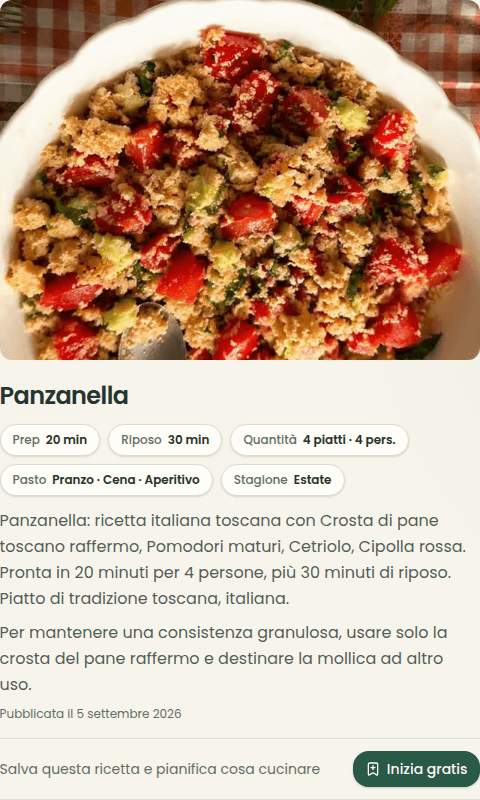
A catalog example: panzanella
This public recipe is associated with an Instagram reel. The saved result separates ingredients from instructions instead of keeping only a bookmark to the post.
The recipe lists 250 g of stale bread crust, 500 g of tomatoes and one cucumber. Quantities given as to taste remain approximate: compare them with the source before cooking and edit your own copy.
Screenshot of the existing Italian recipe, checked on 7 September 2026. This is not a cooking test.
On 2 October 2026 we submitted the same link to the public no-account preview: one request returned 8 ingredients and 5 steps in about 8.5 seconds. This is a single observation without saving after sign-in, not a benchmark of all videos or the full import.
The new preview listed 300 g of bread and 600 g of tomatoes, compared with 250 g and 500 g in the existing card. We did not verify those amounts against the video: quantities, times and servings may include estimates. Check the source before using the result.
From a saved recipe to dinner
Keeping the link is just the start: plan what to cook and bring ingredients into your household grocery list.
What it reads from an Instagram post
Every post exposes different information. Memotaste uses what Instagram actually makes accessible from the link.
- Reel with the recipe in the caption
- Reads the caption and splits it into title, ingredients, amounts and steps.
- Reel where the recipe is only spoken
- When the caption is not enough, it listens to the video and writes the recipe from what is said.
- Recipe written in the photos
- If the recipe is in the images of a carousel, take a screenshot and import it as a photo.
- Private account
- Cannot be read. Memotaste never signs in to your account or works around privacy settings.
From the reel to your recipe box
1 / 3
Copy the link
On Instagram, tap the paper plane under the reel, then Copy link.
2 / 3
Paste it into Memotaste
In the field at the top of your recipe box or in Add recipe. On Android you can also tap Share and pick Memotaste.
3 / 3
Check and save
The recipe arrives editable, with the link to the reel. Add by hand whatever the video leaves out.
Good to know first
- The reel must be public and still online.
- If Instagram does not let the video be heard, you are told, and you can paste the text or photograph the recipe.
- Amounts, times or steps the video never gives have to be added by hand.
- Free for up to 10 recipes a day for personal use; Pro has no daily cap.
Questions about Instagram
Can I get the recipe from a reel with no caption?
Yes. When the caption does not hold the recipe, Memotaste listens to what is said in the video. If Instagram does not make it accessible, you are told and can paste the text by hand.
How is this different from Instagram's Saved folder?
Saved keeps the post, not the recipe, so you have to watch the video again to find it. In Memotaste the ingredients and steps are written out and searchable by ingredient, with the link to the reel on the card.
If the reel is deleted, do I lose the recipe?
No. The recipe saved in Memotaste is your own copy and stays even when the video is no longer online.
Does it work on iPhone?
Yes, from the website. Copy the reel's link and paste it into Memotaste. On iPhone Memotaste does not appear in the Share menu yet, because there is no iOS app.