
How to save Instagram and TikTok recipes in a recipe organizer
A guide by Memotaste ·
To turn an Instagram or TikTok recipe into a usable recipe card, copy the video's link, import it into Memotaste and check the ingredients, quantities and instructions before cooking. You get an editable copy in your recipe collection, with a reference to the original source, rather than just a bookmark to the post.
Try it with a videoA catalog example: panzanella
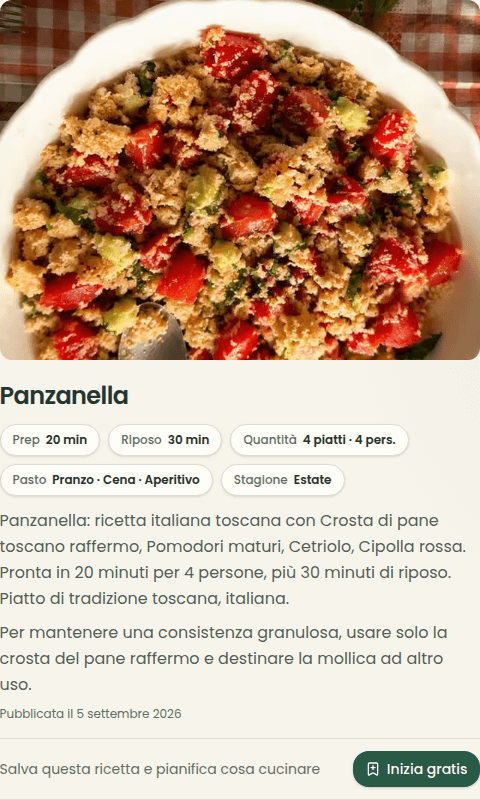
This public recipe is associated with an Instagram reel. The saved result separates ingredients from instructions instead of keeping only a bookmark to the post.
The recipe lists 250 g of stale bread crust, 500 g of tomatoes and one cucumber. Quantities given as to taste remain approximate: compare them with the source before cooking and edit your own copy.
Screenshot of the existing Italian recipe, checked on 7 September 2026. This is not a cooking test.
On 2 October 2026 we submitted the same link to the public no-account preview: one request returned 8 ingredients and 5 steps in about 8.5 seconds. This is a single observation without saving after sign-in, not a benchmark of all videos or the full import.
The new preview listed 300 g of bread and 600 g of tomatoes, compared with 250 g and 500 g in the existing card. We did not verify those amounts against the video: quantities, times and servings may include estimates. Check the source before using the result.
In this guide
Steps
- 1
Copy the recipe video's link
Open the video and look for the copy-link option in the platform's sharing menu. Use the individual video's link, not the creator's profile. The content must be accessible: private accounts, deleted posts or platform restrictions can prevent an import.
- 2
Import the video into Memotaste
On Android, with Memotaste installed from Google Play or the browser, tap Share in the social app and pick Memotaste. On iPhone, copy the link and switch back to Memotaste: the app can offer to import the link you just copied; otherwise paste it into the field at the top of your recipe collection or in Add recipe. Importing builds a recipe card from the caption and, when that is not enough, from what is said in the video. YouTube, Facebook and web pages are also supported; completeness and timing depend on the original content.
- 3
Check quantities, instructions and meal type
Compare the recipe card with the video, especially amounts, servings, times and ingredients mentioned only in speech. Correct any errors and select suitable meal types, such as lunch or dinner. If the source does not give a quantity, do not treat an automatic estimate as a verified measurement.
- 4
Save your version and use it in your meal plan
You can edit your saved copy without rewriting the original recipe used for imports. Find it in your recipe collection and add it to a planning date when you want to cook it. Ingredients from upcoming meals within the shopping list's date range contribute to the list.
Common questions
- Do I need an account to import a recipe?
- Importing needs a free account. It reads the video's description and captions and, when they are not enough, its audio too, then saves an editable copy in your recipe box.
- What if ingredients or quantities are missing?
- Reopen the original video and check its description, spoken instructions and on-screen text. After signing in you can edit your copy. If the source does not give an amount, ask the creator or use a recipe that does: an automatic estimate does not confirm the original quantity.
- How is this different from saving a post on Instagram?
- A saved post remains a link to the social platform. A structured recipe organizer separates ingredients and instructions, lets you edit them and connects the recipe to meal planning. Importing does not replace credit to the original creator.
- Can I start for free?
- Import for free from any source, for personal use and with protections against abuse. Manual entry is free too. Pro offers more translations and photo analyses and a household for up to six people.
- How do I save a TikTok or Instagram recipe on iPhone?
- In the social app, tap Share and then Copy link. Open Memotaste: if the link is from a supported platform, the app offers to import it; otherwise paste it into the field at the top of your recipe collection or in Add recipe. On iPhone Memotaste does not yet appear in the Share menu, because there is no native iOS app.
- Does Memotaste read what is said in the video?
- Yes: when the caption is not enough, the import transcribes the public video's audio and combines it with the description. Text that appears only inside the video frames may not be read, so always check quantities and steps.
- How long does an import take?
- Usually a few tens of seconds. Across five YouTube imports measured between 8 and 15 September 2026, the median was about 18 seconds and the slowest close to 28. That is a small sample: long videos or ones that need the audio can take longer.
- What if a recipe link cannot be imported?
- Check that it points to the video and that the content is still accessible. If importing fails, you can enter the recipe manually through Add recipe, Your own recipe. You do not need to make private accounts or content public to work around an error.
From saved recipes to everyday meals
Save recipes you like and choose when to cook them: Memotaste collects the ingredients in your grocery list.
Start free