
Turn a recipe video into something you can cook
Paste a public video link: Memotaste reads its description, captions and, when needed, its speech, and turns them into ingredients, amounts and steps in a recipe of your own, to correct and find again when you cook.
Save your first recipe from a video
Create a free account and paste the link: the recipe lands in your recipe box, ready to edit, plan and add to your grocery list.

Updated 3 October 2026. Importing only reads the link you submit. It does not access your social accounts.
A catalog example: panzanella
This public recipe is associated with an Instagram reel. The saved result separates ingredients from instructions instead of keeping only a bookmark to the post.
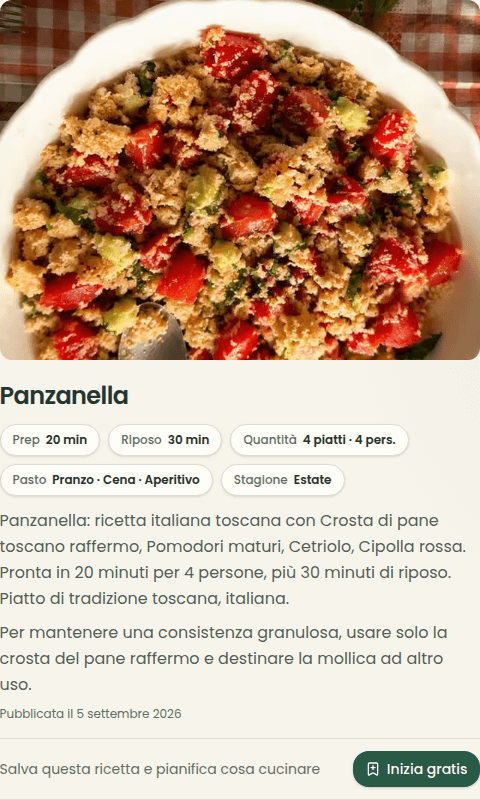
The recipe lists 250 g of stale bread crust, 500 g of tomatoes and one cucumber. Quantities given as to taste remain approximate: compare them with the source before cooking and edit your own copy.
Screenshot of the existing Italian recipe, checked on 7 September 2026. This is not a cooking test.
On 2 October 2026 we submitted the same link to the public no-account preview: one request returned 8 ingredients and 5 steps in about 8.5 seconds. This is a single observation without saving after sign-in, not a benchmark of all videos or the full import.
The new preview listed 300 g of bread and 600 g of tomatoes, compared with 250 g and 500 g in the existing card. We did not verify those amounts against the video: quantities, times and servings may include estimates. Check the source before using the result.
From a saved recipe to dinner
Keeping the link is just the start: plan what to cook and bring ingredients into your household grocery list.
What changes from one platform to another
Not every video exposes the same information. Importing uses what the source actually makes accessible.
- YouTube
- Uses the available title, description and captions. Videos with a clear transcript are usually the easiest to read.
- Checks the Reel caption first and, when it does not contain the recipe, listens to the video’s speech.
- TikTok
- Reads accessible post text and, when that is not enough, recovers the recipe from the video’s speech.
- Works with public videos reachable through the link. Private, deleted or platform-restricted posts cannot be read.
From the link to your recipe box
1 / 3
Check the source
It reads the available description or captions of the public video you choose. It does not access your social accounts.
2 / 3
Rebuild the recipe
It separates the title, amounts, ingredients, timings and steps. Missing or ambiguous details may need correction.
3 / 3
Make it yours
After signing in, you save an editable card while keeping the link to the original source.
Known limitations
- The video must be public and still available.
- If the recipe is only spoken, the import tries to listen to the video; when the platform does not allow it, we tell you.
- Amounts, timings or steps missing from the source may need correction.
- Personal imports are free up to 10 recipes a day, with protections against automation and abuse.
Questions about the tool
Can I import a Reel from a private account?
No. Memotaste does not sign in to your social account or bypass privacy settings. The video must be publicly reachable from its link.
What if the recipe only exists in the spoken audio?
The import tries to recover it from the video’s audio. If the platform does not make it accessible, we tell you, and you can paste the text or photograph the recipe.
Is the extracted recipe always correct?
No. A source may omit amounts or steps, and speech can be ambiguous. Always check your copy before cooking, especially allergens, timings and temperatures.
Is importing free?
Yes, up to 10 recipes a day for personal use; Pro has no daily limit. Memotaste also applies protections against automation and abuse.